 |
 Home | Webstore Home | Webstore
|
|
Latest News:
OOTP 27 Buy Now
- FHM 12 Available
- OOTP Go! 27 Available
Out of the Park Baseball 27 Buy Now! |

|
|
||||
| ||||
|
|||||||
| FHM Mods This is the place to check for mods for both FHM12 and previous versions. |
 |
|
|
Thread Tools |
 11-09-2022, 04:01 PM
|
#1 |
|
Major Leagues
Join Date: Jun 2013
Posts: 303
|
Hockey Cards
I did do some searching but didn't find much on the forums in regards to custom hockey cards so I began knocking up my own
 Not finished by any means (and Cam Fowler isn't really Ben Gaudreau) but wanted to gauge thoughts on if there was any interest in getting a finished version uploaded or feedback on where they could be improved (besides the small clipping issues) |

|

|
|
11-11-2022, 03:52 PM
|
#2 |
|
All Star Reserve

Join Date: Oct 2017
Location: Oregon
Posts: 817
|
Real player photos on the cards would be awesome, just as they would in replacing the facegen in general.
|
|
|
|
|
11-12-2022, 07:54 AM
|
#3 | |
|
Major Leagues
Join Date: Jun 2013
Posts: 303
|
Quote:
|
|
|
|
|
|
11-12-2022, 03:13 PM
|
#4 |
|
All Star Reserve
Join Date: Oct 2017
Location: Oregon
Posts: 817
|
Yeah, but the real photo looks so much better on the cards than the Facegen files.
|
|
|
|
|
11-13-2022, 10:32 AM
|
#5 |
|
Major Leagues
Join Date: Jun 2013
Posts: 303
|
After spending more hours than I could care to admit, I have tweaked it enough to my liking so far. Still struggling to get the team names appearing though
 First 4 images are just with a photopack, bottom left 2 are with fully zoomed out facegen, and bottom right 2 are the non zoomed version |
|
|
|
|
11-14-2022, 03:24 AM
|
#6 |
|
Banned
Join Date: Jul 2012
Posts: 70
|
It would be awesome to get the hockey cards with actual player pics and not those dumb facegens.
On top do I really like you card design  I hope you release your version to the public once your finished
|
|
|
|
|
11-14-2022, 04:35 AM
|
#7 | |
|
Major Leagues
Join Date: Jun 2013
Posts: 303
|
Quote:
Currently fanangling with trying to get the full name/team name options working but once done, I am thinking of releasing them (I believe the fonts I've used are all windows standards so should work) Whilst I'm doing that, I've also been toying with the 90's player cards as well |
|
|
|
|
|
11-14-2022, 09:49 AM
|
#8 |
|
Banned
Join Date: Jul 2012
Posts: 70
|
The weird thing here is, that the game creates a "playername_birthdate_away.png" file which is used for those cards.
|
|
|
|
|
11-14-2022, 10:25 AM
|
#9 | |
|
Major Leagues
Join Date: Jun 2013
Posts: 303
|
Quote:
If theres a facegen already there, a quick auto-reload picture replaces it with the photo |
|
|
|
|
|
11-15-2022, 03:08 AM
|
#10 |
|
Banned
Join Date: Jul 2012
Posts: 70
|
Thanks for the tip. Haven't tweaked this setting yet.
|
|
|
|
|
11-17-2022, 11:25 AM
|
#11 |
|
Major Leagues
Join Date: Jun 2013
Posts: 303
|
Soooooo
I kinda revamped my design a little bit, and feel its close to a v1 drop  Still trying to get the team name part working and a slight bit of tidying up around the team colours, and then will probably drop a .zip file |
|
|
|
|
11-17-2022, 12:32 PM
|
#12 |
|
Major Leagues
Join Date: Apr 2017
Posts: 416
|
Sweet!!!
|
|
|
|
|
11-17-2022, 12:53 PM
|
#13 |
|
All Star Reserve
Join Date: Oct 2017
Location: Oregon
Posts: 817
|
Very nice!
|
|
|
|
|
11-17-2022, 02:14 PM
|
#14 |
|
Banned
Join Date: Jul 2012
Posts: 70
|
Wow, how sweet is that. Can't wait for the initial release
|
|
|
|
|
11-17-2022, 07:05 PM
|
#15 | |
|
All Star Reserve

Join Date: Oct 2021
Posts: 862
|
Quote:

|
|
|
|
|
|
11-18-2022, 07:55 AM
|
#16 |
|
Major Leagues
Join Date: Jun 2013
Posts: 303
|
Consider this a beta release for now.. I use a LOT of downloaded fonts and to my knowledge the font used is a windows standard.
If not then let me know and I can then adjust the font and spacing. I'm also still trying to work out the TEAMNAME and TEAMNICK functionality and will be added to the file once resolved Install to Documents\Out of the Park Developments\Franchise Hockey Manager 9\quickstart_games\Current.quick\graphics\cards or to the cards folder in your saved game to get them to appear Photos or Facegen imagery is based purely on your settings and mods installed |
|
|
|
|
11-18-2022, 08:46 AM
|
#17 | |
|
Major Leagues

Join Date: Oct 2017
Location: I hate hackers!
Posts: 390
|
Quote:
|
|
|
|
|
|
11-18-2022, 08:59 AM
|
#18 |
|
Banned
Join Date: Jul 2012
Posts: 70
|
Pregame and loading screen I guess.
They look really nice ingame Edit: For some unknown reason the card on the right "misses" every time I'm loading a new day: 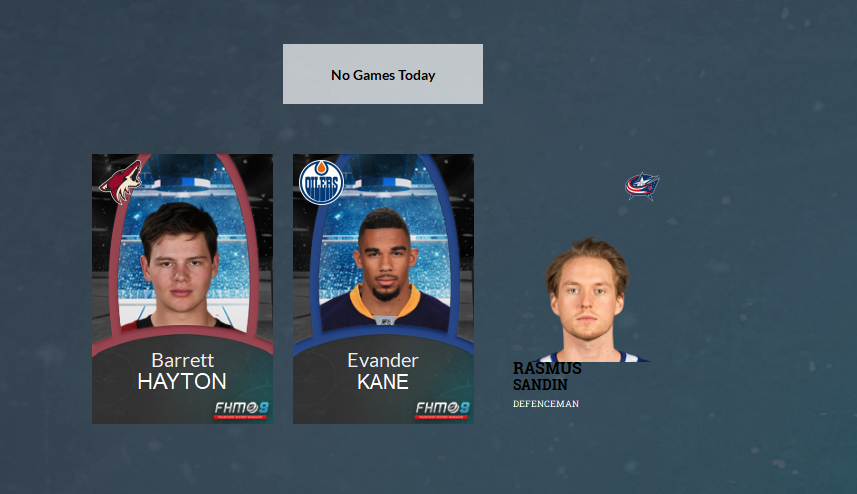
Last edited by PHI34Halladay; 11-18-2022 at 09:02 AM. |
|
|
|
|
11-18-2022, 09:31 AM
|
#19 | |
|
Major Leagues
Join Date: Jun 2013
Posts: 303
|
Quote:
Did you add it to a current game or into quick save and I'll have a look later on tonight and see if there is anything I can find causing it Edit - Saying that.. it looks like it's gone back to default positions. Do you have 2 info.txt files in there? Last edited by TheAdamBn; 11-18-2022 at 09:32 AM. |
|
|
|
|
|
11-18-2022, 09:37 AM
|
#20 | |
|
Banned
Join Date: Jul 2012
Posts: 70
|
Quote:
|
|
|
|
|
|
| Bookmarks |
|
|


